

The landscape of cyberthreats is constantly changing, and a significant development in the past few years is related to browser extension attacks. Indeed, although hacking passwords used to be the main challenge of the day, modern cybercriminals concentrate their efforts on browser extensions, which provide better access to systems, have no protection measures in place, and allow collecting more information about users.
Extension can help perform any online task today. It could be a password manager, an ad blocker, a tool that assists you in writing essays, a productivity app, a crypto wallet, a spell checker, and many other useful applications. At the same time, this feature brings certain risks.
Modern hackers realize how easy and effective it can be to compromise a browser extension. With its help, criminals gain access to your browsing history, monitor your logins, intercept your emails, steal authentication cookies, inject malware, follow your financial transactions, and even disable MFA.
According to some reports in the field of cybersecurity, millions of people worldwide have already experienced being victims of malicious attacks involving browser extensions in browsers such as Google Chrome, Microsoft Edge, and Mozilla Firefox. The most disturbing thing is that several of these
What Is a Browser Extension?
Extension is a software application that resides in a web browser, which offers additional functionality.
Examples of commonly used browser extensions include:
- Ad blockers
- Password managers
- AI writing assistants
- VPNs
- SEO tools
- Screen capture apps
- Cryptocurrency wallet browser extensions
- Shopping helpers
- Productivity tools
- Grammar checkers
Browser extensions have access to browser data, cookies, history, websites visited, browser activities, and clipboard data among others, based on permissions granted by users.
This makes browser extensions very potent but also highly vulnerable.
Why Hackers Have Turned Their Focus from Passwords to Browser Extensions
1. Browser Extensions Have Pre-existing Privilege for Access
Passwords have several security layers:
- Encryption
- Multi-factor authentication
- Security alerts
- Login tracking
- Password managers
These security measures are often bypassed as users grant permission during installation of browser extensions.
After installation, extensions can gain access to:
- Logged-in session
- Website resources
- Open tabs
- Cookie data
- Auto-fill information
- Clipboard content
- Cloud-based applications
2. Session Cookies Have More Value Than Passwords
The current generation of cyber criminals focuses on stealing session cookies rather than passwords because session cookies help them circumvent security measures. Despite multi-factor authentication, OTP verification services, and login warnings, cyber criminals can directly log into any account by stealing the session cookies without having to go through the password. Therefore, session hijacking is one of the most rapidly spreading web extension attacks.
Reasons why attackers prefer session cookies:
- Evade MFA authentication
- Avoid OTP verification services
- Circumvent login security checks
- Gain instant access to active user sessions
- Login without using passwords
- Stay hidden for extended periods
3. Extensions Work in Stealth Mode in the Background
Most browser extensions work in stealth mode in the background without drawing the attention of the user. The user installs the extension just once and then pays no further attention to its activity. Due to this feature, attackers can inject malicious code into an extension and carry out various operations without being noticed by the user.
Operations that attackers can perform stealthily using extensions:
- Tracking browsing history
- Capturing personal information
- Inserting malware into webpages
- Performing phishing attacks
- Stealing login details and tokens
- Remaining unnoticed for months and years
4. Security Reviews of Browsers Are Insufficient
There are many individuals who believe in the credibility of the browser stores entirely, considering all the available extensions to be legitimate. However, hackers have developed a technique to bypass such security mechanisms by initially releasing the extension in its safe form, allowing it to gain popularity and positive feedback. This way, when it is eventually updated to harm the user, it is already considered trustworthy.
Strategies adopted by hackers while developing malicious extensions:
- Releasing the safe version initially
- Generating good reviews and ratings
- Creating a significant user base
- Updating to a harmful version later
5. Extensions Have Access to Corporate Information
The main cybersecurity threat that browser extensions present in business is due to their prevalence in most day-to-day tasks. Since attackers can gain access to the information stored on the browser by installing malicious browser extensions, stealing confidential business information, observing user actions, or compromising corporate networks is possible.
Examples of corporate information systems extensions can get access to include:
- Company email accounts
- Cloud storage services
- CRM applications
- HR and payroll software
- Finance dashboards
- Communication systems
- Project management systems
6. Browser Workflows Have Become Dominant
Today’s workplaces have come to depend on browsers for tasks, communication, and cooperation. The employees spend much of their working hours using browser applications such as cloud services, communication applications, and AI applications. With the growing prevalence of browsers, hackers are focusing more and more on extension exploits since compromising a browser compromises an organization’s entire workflow.
Browser applications commonly used by employees:
- Google Workspace
- Microsoft 365
- Slack
- Salesforce
- Zoom
- Notion
- Jira
- AI productivity applications
Forms of Browser Extension Attacks
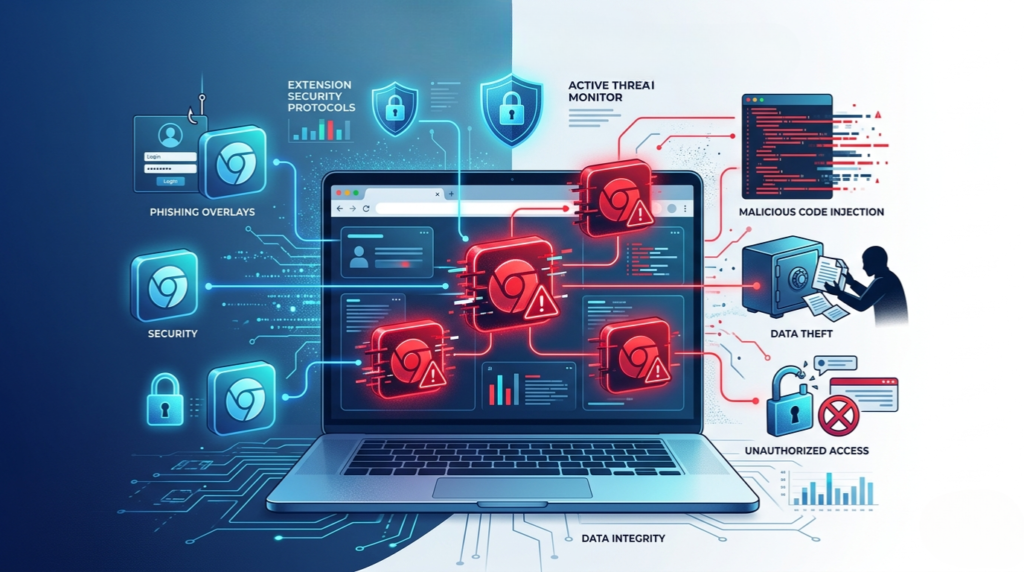
1. Malicious Browser Extensions
They are fraudulent extensions developed to exfiltrate data.
Examples include:
- Fraudulent AI tools
- Fraudulent crypto wallets
- Fraudulent VPNs
- Fraudulent PDF converters
- Fraudulent shopping assistants
Cybercriminals often leverage AI themes to deceive people.
2. Compromised Legitimate Browser Extensions
In such cases, cybercriminals exploit legitimate extensions using:
- Compromised developer accounts
- Phishing campaigns
- Supply chain exploits
The users get automatically updated by installing malicious updates.
It is among the most hazardous types of extension attacks.
3. Ad Injection Browser Extensions
Such extensions place advertisements on websites to earn money.
They might:
- Redirect search queries
- Substitute ads
- Alter search results
- Inject affiliate links
4. Spyware Browser Extensions
Spyware extensions covertly observe:
- Browsing activities
- Keystroke logs
- Login credentials
- Financial data
- Clipboard actions
Some spyware campaigns have infected millions of users worldwide.
5. Cryptocurrency Mining Browser Extensions
Cryptocurrency mining browser extensions exploit computer resources to mine cryptocurrencies.
Indicators include:
- Slow browsers
- High CPU utilization
- Battery drainage
- Overheated computers
Real-World Examples of Browser Extension Attacks
Cyberhaven Attack
In a widespread browser extension attack, many Chrome extensions targeting about 2.6 million devices were attacked using phishing attacks and malware updates.
Sleeper Spyware Campaign in Browser Extensions
Experts found out that browser extensions worked properly for years before becoming malware and attacking more than 4 million devices with spying capabilities.
Fake AI Browser Extensions
Nowadays, cybercriminals have started creating fake AI-based browser extensions mimicking some popular generative AI applications.
Why Browser Extension Attacks Are Dangerous for Businesses
Data Theft
Attackers can steal:
- Customer records
- Financial data
- Internal communications
- Cloud credentials
Supply Chain Risks
A third-party extension could create significant risks to supply chains since people tend to trust applications developed by other individuals. Once hackers take over an account and distribute an extension, they will instantly infect thousands or even millions of computers with malware. In that regard, browser extension hacking poses a severe threat to both end-users and organizations.
Compliance Violations
Businesses may violate:
- GDPR
- PCI DSS
- HIPAA
- SOC 2
Browser-side attacks are increasingly causing compliance concerns.
Credential Theft
Hackers can steal credentials, authentication tokens, and session cookies using malicious extensions by collecting data from browsers. They can hijack users’ accounts, bypass security controls, and infiltrate networks without entering passwords.
Financial Fraud
Fraudsters exploit extensions by manipulating bank sessions and payment portals behind the scenes. They can alter transaction details, transfer funds, or steal payment information through financial websites.
Browser Extensions vs Password Attacks
| Factor | Password Attacks | Browser Extension Attacks |
|---|---|---|
| Requires cracking credentials | Yes | Often No |
| Can bypass MFA | Difficult | Easier |
| User visibility | Higher | Lower |
| Persistence | Limited | Long-term |
| Access level | Login only | Full browser activity |
| Detection difficulty | Moderate | High |
| Attack scale | Medium | Massive |
How to Protect Yourself from Browser Extension Attacks

As browser extension hacking continues to gain popularity among attackers, individuals and companies must take steps to improve their browser security. Due to the high privileges that extensions usually enjoy, one malicious extension could potentially leak personal details, passwords, and organizational resources. Adopting preemptive protective measures will minimize exposure to cyberattacks and any unauthorized access.
1. Only Install Reliable Extensions
It is advisable to only download extensions that come from reputable vendors and authorized browser extensions repositories. When downloading any extension, users need to analyze ratings, user feedbacks, vendor reputation, and updates before installing. Hackers frequently mask their malware by presenting it as a productivity tool that would benefit users, hence necessitating the need for due diligence.
Factors to consider when installing extensions include:
- User ratings and reviews
- Number of installations
- Vendor reputation
- Updates
- Official website legitimacy
2. Limit Installed Extensions
An excessive number of installed extensions increases the attack surface and leads to further security problems. Some users neglect the presence of extensions that they no longer use but still run in the background. It is always recommended to remove any unnecessary extensions from the browser.
Advantages of limiting extensions include:
- Reducing security vulnerabilities
- Enhancing the performance of browsers
- Decreasing the risk of data disclosure
- Avoiding dangerous updates
3. Be Wary of Permissions
Most browser extensions require various permissions and gain full control over users’ actions and websites that are browsed by them. It is crucial to analyze the permissions requested during installation and decline those that seem irrelevant.
Extensions that require permission to:
- Browse through all data on websites
- Read the content of the clipboard
- Change browser settings
- Monitor browsing activity
- Manipulate downloads and tabs
4. Update Your Browser
Browser updates are crucial in mitigating the risk of vulnerabilities and new cyber attacks. Browser companies often provide security updates that address weaknesses in their products, which hackers might use to compromise systems via malicious browser extensions or browser-level attacks. Updating your browser will provide additional protection against these evolving cyber risks.
Why updating your browser is important:
- Addresses security vulnerabilities
- Increases malware protection
- Enhances browser security measures
- Minimizes exploitation opportunities
5. Employ Browser Security Solutions for Enterprises
Organizations need to invest in sophisticated browser security solutions to track the activities of any browser extension, including suspicious ones, and to monitor any changes in permissions.
What enterprises should be monitoring:
- Browser extension activity
- Changes in permissions
- Suspicious updates
- Malicious network traffic
Conclusion
The field of cybersecurity has undergone radical changes. Hackers do not limit themselves to passwords anymore since browser extensions provide a much better opportunity – access to users’ actions, sessions, cloud apps, and personal information.
Browser extension hacks are covert, scalable, and extremely efficient. Hackers utilize legitimate extensions, violate permissions, steal authentication tokens, and successfully avoid conventional protection mechanisms.
In light of the increasing centralization of browser-based activities and identity management, it is essential for both private individuals and businesses to reconsider their approaches to browser security, monitor installed extensions, and minimize browser permissions where possible.
The future of cybersecurity largely depends on protecting the ecosystem of browsers – an objective that cyber attackers have already achieved.
FAQs
What are browser extension attacks?
It attacks occur when hackers exploit browser add-ons to steal data, hijack sessions, inject malware, or monitor user activity.
Why are hackers targeting browser extensions?
Hackers target browser extensions because they often have deep access to browsing data, cookies, sessions, and cloud applications.
Can browser extensions bypass MFA?
Yes. Malicious extensions can steal authentication cookies and session tokens, allowing attackers to bypass MFA protections.
Are Chrome extensions safe?
Most Chrome extensions are safe, but some may contain malicious code or become compromised through updates.
How do I know if a browser extension is malicious?
Warning signs include browser slowdowns, strange ads, redirected searches, unusual permissions, and unauthorized account activity.
How can businesses protect against browser extension attacks?
Businesses should implement browser security policies, monitor extensions, restrict permissions, audit installations regularly, and educate employees about cybersecurity risks.
Are AI browser extensions risky?
Some AI browser extensions may pose security risks if developed by untrusted publishers or designed to steal user data.